Your WooCommerce Products Can Now Show Up in Copilot and Bing: What Microsoft Brand Agents Are
As of November 4, 2026, Microsoft Clarity's Brand Agents can surface products from eligible WooCommerce stores in Copilot, Bing, and MSN. Here's what they are, how to set them up, and what they don't promise.
D
Dariel Corchado
MD3 Digital Solutions
The short version: on November 4, 2026, Microsoft announced that Microsoft Clarity’s Brand Agents no longer work only inside your store. If your WooCommerce store is eligible and you accept the terms, your products can show up in Microsoft Copilot, Bing, and MSN when someone asks AI for a recommendation. The purchase still happens on your own website.
Your customers don’t always come from Google anymore
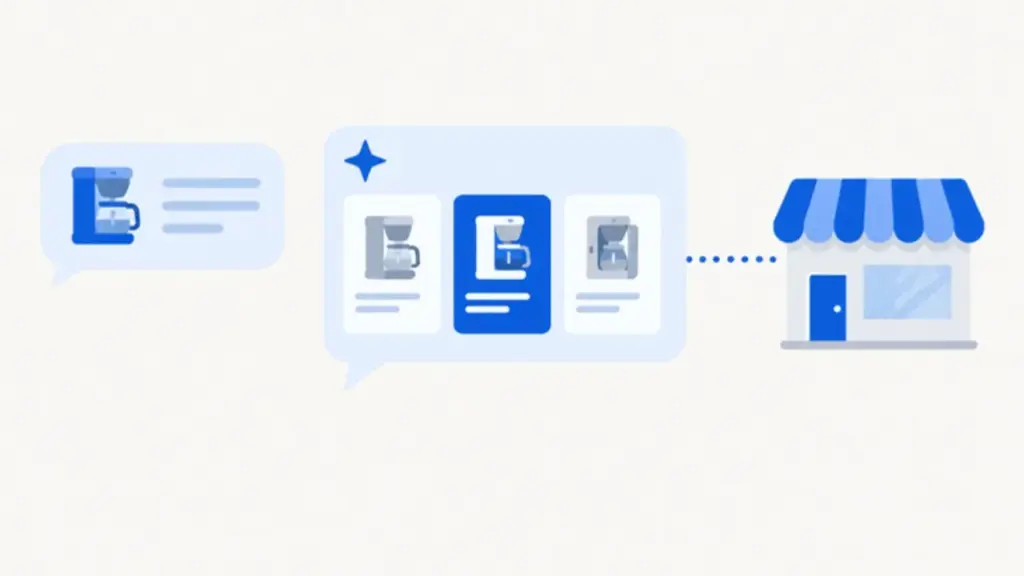
Sometimes a customer searches Google and clicks a result. Other times they skip that and ask an AI assistant: “What coffee maker do you recommend under $100?” The AI answers with three or four products, and the customer picks from that list.
Until recently, your store mostly competed in search results. Now it also competes in those answers. If your products aren’t in the data the AI looks at, your store doesn’t exist for that shopper. That’s what Microsoft’s announcement changes.
What Microsoft Brand Agents are
A Brand Agent is an AI shopping assistant that lives on your website and speaks in your brand’s voice. Microsoft compares it to an expert salesperson in the store: it listens to what the customer wants, asks the right questions, compares products, and helps them decide.
What sets it apart from a generic chatbot is where its answers come from. A Brand Agent works from your live catalog, your shipping and return policies, and your brand voice. It doesn’t make up products or prices. It uses your store’s real information.
Microsoft launched Brand Agents in January 2026 for Shopify stores. Until now, they were mostly an on-site helper. What’s new is that the help now reaches beyond your site.
What changed on November 4, 2026
That day, Microsoft posted on the Microsoft Clarity blog that Brand Agents now extend product discovery beyond the website. The key line from the announcement: for eligible WooCommerce and Shopify merchants, products can appear in Microsoft Copilot, Bing, MSN, and other services when shoppers ask AI for recommendations.
Here’s how the path would work:
Someone asks Copilot for a recommendation or searches on Bing.
The AI shows a few products, and one of them may be yours.
They click through to your site.
They buy in your store, not inside Copilot.
Don’t confuse this with Copilot Checkout, Microsoft’s separate system where the purchase happens inside the conversation. With Brand Agents, the sale stays yours. So do the customer, the order, and the relationship.
If you already have Brand Agents installed, Microsoft says you don’t need to upload your catalog again. And during setup, you can choose to use it only for showing up in AI experiences, without putting a chat widget on your store.
What your WooCommerce store needs to be eligible
Microsoft doesn’t publish a fixed list of requirements, and it’s better to say that up front. Here’s what its official documentation does confirm:
It’s a beta. The service is still being tested, and Microsoft is opening it up in waves. Not every store gets in at the same time.
It’s for Shopify and WooCommerce stores, and for websites only, not mobile apps.
When you accept the terms, you agree to have your catalog published to Microsoft Merchant Center. That’s what makes your products discoverable through Bing and Copilot. It’s the core of the whole system, so understand it before you click accept.
“Eligible” isn’t defined. Microsoft says the new features are available worldwide to all its users, but it doesn’t publish a country list or explain what makes a store “eligible,” even though the word appears several times in the announcement.
There’s no public form that tells you in advance whether your store qualifies. What you can do is get the store ready and request access.
What about cost? Microsoft Clarity is a free analytics tool, and Microsoft says so in its own announcement. For Brand Agents, though, the official sources we checked don’t confirm a price. Read the terms the tool shows you before you turn anything on.
How to set up Brand Agents in WooCommerce, step by step
These are the steps from Microsoft’s official documentation for WooCommerce stores:
Install Microsoft Clarity in WordPress. In your dashboard, go to Plugins > Add New, search for “Microsoft Clarity,” then install and activate it.
Create a Clarity project or connect your existing one. Do it from Settings > Clarity, using your Microsoft account.
Request your Brand Agent. Once the project exists, a window pops up to set up Brand Agents. Select “Get your Brand agent.”
Approve the WooCommerce permissions. A WooCommerce authorization window opens. Review the permissions and select Approve.
Read the terms before you accept. Accepting means your catalog gets published to Microsoft Merchant Center, so check what data is shared. The documentation also says merchants should mention Brand Agents in their site’s privacy policy.
Set up the agent with your branding: welcome message, logo, agent name, colors, and tone. It all comes pre-filled with AI-generated content based on your store, and you can edit it. Take your time here. The agent is going to speak for you.
Test it before going live. Use the live preview and ask what a customer would ask: about a product, about shipping, about a return. If it answers with outdated info, fix that before you move on.
Publish and choose how much traffic sees it. You can show it to every visitor or just a percentage. You can edit, republish, or switch it off whenever you need to.
If the Brand Agents option doesn’t show up at some step, your store most likely hasn’t been approved for the beta yet. According to the documentation, you’ll get an email when your access is ready. There’s no shortcut.
How to prep your catalog before you turn anything on
A Brand Agent can only recommend what it understands, and what it understands is your catalog. A messy catalog gets messy answers, or products the AI just won’t recommend. Before you accept the terms, check these:
Clear, complete titles. “Blue shoe” tells the AI nothing. “Men’s running shoes, size 9, blue” does. Write titles the way a customer would search.
Current prices and stock. Few things kill trust faster than a product the AI recommends at $49 that costs $59 on your site, or one listed as in stock that’s sold out.
Real product photos. At least one clear photo per product, showing what the customer will actually get. (If your images are heavy, here’s how to optimize them in WordPress.)
Descriptions that answer real questions. Who’s it for? What size, what material, what’s included? How long does shipping take?
Shipping and return policies that are easy to find and written in plain language. Microsoft says the agent relies on them. If they’re buried or out of date, the agent can give a wrong answer right when the customer is about to buy.
No duplicate or test products. Remove or mark as unavailable any test products, duplicates, and items you no longer sell.
Business details that match everywhere. Your name, address, phone, and hours should match on your site, your Google Business Profile, and your catalog. It’s the same consistency we check when we audit a site’s metadata and schema. If the details don’t match, the AI doesn’t know which one to believe.
What Brand Agents don’t promise
They don’t promise you’ll show up. Being eligible with a published catalog doesn’t mean your products appear in every Copilot answer. Microsoft doesn’t explain how it decides which products to show or in what order, and nobody can guarantee you a spot.
They don’t promise sales. Showing up in a recommendation is step one. The customer still has to click, land on your store, and buy. If your store is slow, payment fails, or the product page doesn’t convince, the visit is lost anyway. AI discovery won’t fix a store that doesn’t convert.
It’s not advertising. You’re not paying to be listed first. It’s organic discovery, based on your catalog data.
It doesn’t replace the visibility work you’re already doing. Your site still needs to be indexable by Google and Bing, with metadata and schema that say what your business is, and consistent information. At MD3, we already check that our clients’ sites are indexed in Bing, because Bing’s index feeds Microsoft Copilot. Brand Agents add to that work; they don’t replace it. For the bigger picture, see how to get your business noticed by AI tools.
It’s not instant. It’s an approval-based beta and Microsoft hasn’t published timelines. Our take: get your catalog ready now and request access, instead of waiting until all your competitors are already in.
Frequently asked questions
What are Microsoft Brand Agents?
They’re AI shopping assistants from Microsoft Clarity that answer using a store’s real catalog, policies, and brand voice. Since November 4, 2026, they can also make products from eligible stores appear in Copilot, Bing, and MSN.
How do my WooCommerce products show up in Copilot?
By installing Microsoft Clarity, turning on Brand Agents, and agreeing to have your catalog published to Microsoft Merchant Center. From there, your products can appear when someone asks Copilot or Bing for recommendations. Showing up isn’t guaranteed.
Are Brand Agents the same as Copilot Checkout?
No. With Copilot Checkout, the purchase happens inside the conversation. With Brand Agents, the customer clicks through and buys in your store, so the order and the customer relationship stay yours.
How much do Brand Agents cost?
Microsoft Clarity is free. For Brand Agents, the official sources we checked as of November 6, 2026 don’t confirm a price. Review the terms the tool shows you before you activate it.
Is my WooCommerce store eligible?
Microsoft doesn’t publish a definition of “eligible” or a list of countries. The service is in beta and opening in waves. If you don’t see the Brand Agents option while setting up Clarity, your store doesn’t have access yet; Microsoft will email you when it does.
How MD3 Digital Solutions can help
If you run a WooCommerce store, this is the kind of change worth preparing for calmly, not at the last minute. Here’s how we can help:
We check whether your store is ready: Clarity installed and set up correctly, a complete and current catalog, and clear, visible shipping and return policies.
We get your catalog ready for AI. We review titles, descriptions, prices, inventory, and images, and fix anything incomplete or duplicated before it’s published to Microsoft Merchant Center.
We review your visibility in Bing and Copilot. We make sure your site is indexed in Bing, that your metadata and schema describe your business accurately, and that your information is consistent.
We set up and test the Brand Agent with you. We configure it in your brand’s voice, test it with real customer questions, and roll it out to part of your traffic first.
Want to know if your WooCommerce store is ready to show up in Copilot and Bing? Contact us, email [email protected], or call (786) 757-4345.
Sources accessed November 6, 2026. In the official sources we checked, Microsoft doesn’t publish a country list, a definition of “eligible merchant,” or a price for Brand Agents; this post says so instead of treating those details as confirmed.
Agencies are selling "GEO" as a secret trick. Google's own guide says there are no extra technical requirements: appearing in AI Overviews is good SEO. Here's what to do instead.
Google's Search Console now has a Generative AI Performance report. Here's how to find it, what it measures (and what it doesn't), and how to read it without jargon.
Since late October 2026, Google has been showing the AI Overview for many brand searches where the knowledge panel used to be. Here's what changed and how to check what AI says about your company.